Text and Fonts
compose2pdf supports rich text styling through standard Compose text APIs, with automatic font embedding for consistent rendering.
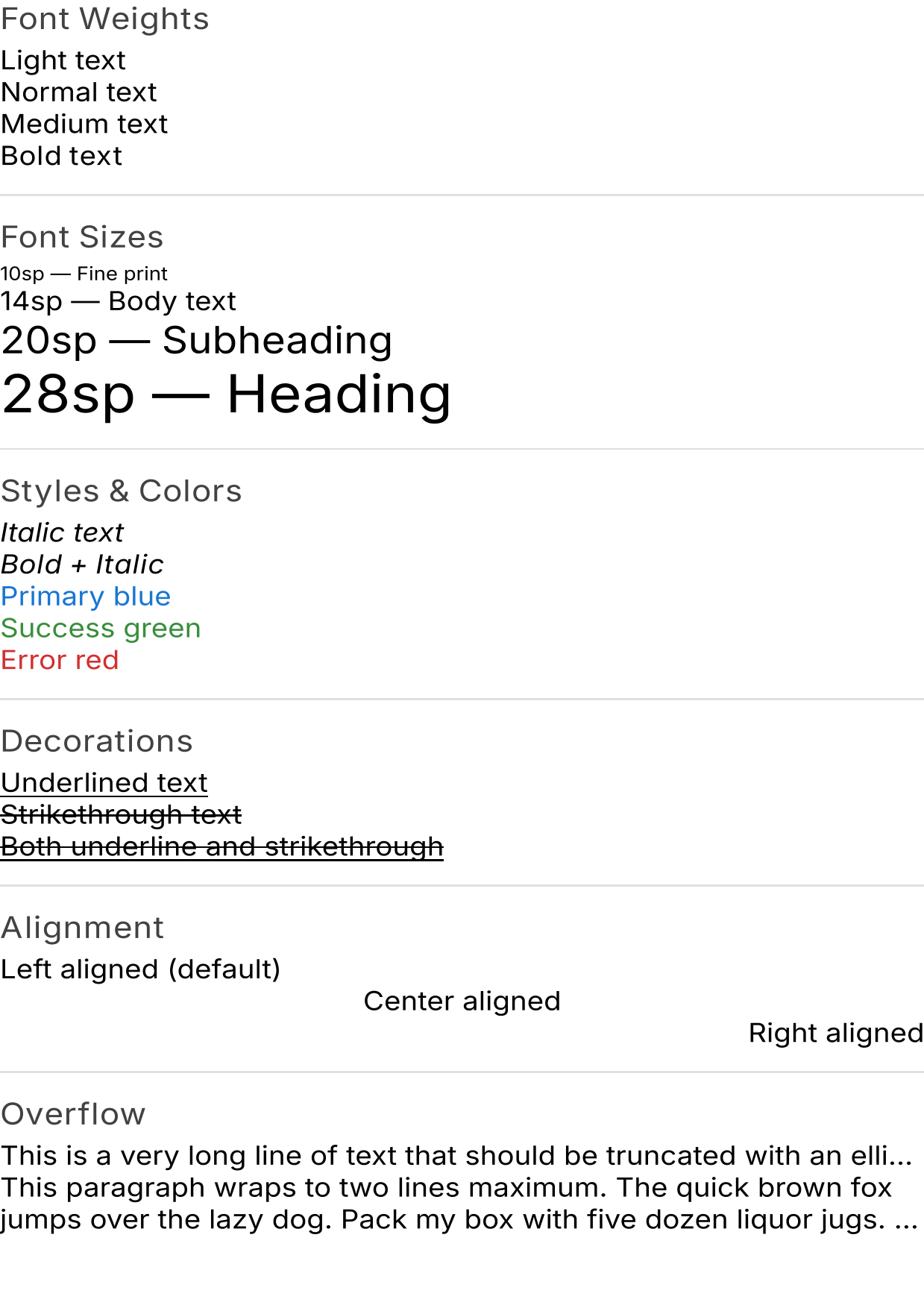 Text styling example — download PDF
Basic text styling
renderToPdf {
    Column(Modifier.padding(24.dp), verticalArrangement = Arrangement.spacedBy(8.dp)) {
        Text("Normal text")
        Text("Bold text", fontWeight = FontWeight.Bold)
        Text("Italic text", fontStyle = FontStyle.Italic)
        Text("Bold italic", fontWeight = FontWeight.Bold, fontStyle = FontStyle.Italic)
        Text("Large heading", fontSize = 36.sp)
        Text("Small caption", fontSize = 10.sp)
        Text("Custom color", color = Color(0xFF1976D2))
    }
}
Text decorations
Text("Underlined", textDecoration = TextDecoration.Underline)
Text("Strikethrough", textDecoration = TextDecoration.LineThrough)
Text(
    "Both decorations",
    textDecoration = TextDecoration.Underline + TextDecoration.LineThrough,
)
Text alignment
Column(Modifier.fillMaxWidth()) {
    Text("Left aligned (default)")
    Text("Center aligned", textAlign = TextAlign.Center, modifier = Modifier.fillMaxWidth())
    Text("Right aligned", textAlign = TextAlign.End, modifier = Modifier.fillMaxWidth())
}
Spacing
Text("Wide letter spacing", letterSpacing = 4.sp)
Text("Tall line height", lineHeight = 28.sp)
Overflow and truncation
Text(
    "This very long text will be truncated with an ellipsis if it overflows...",
    maxLines = 1,
    overflow = TextOverflow.Ellipsis,
)

Text(
    "This text is limited to two lines and will truncate after that...",
    maxLines = 2,
    overflow = TextOverflow.Ellipsis,
)
Fonts
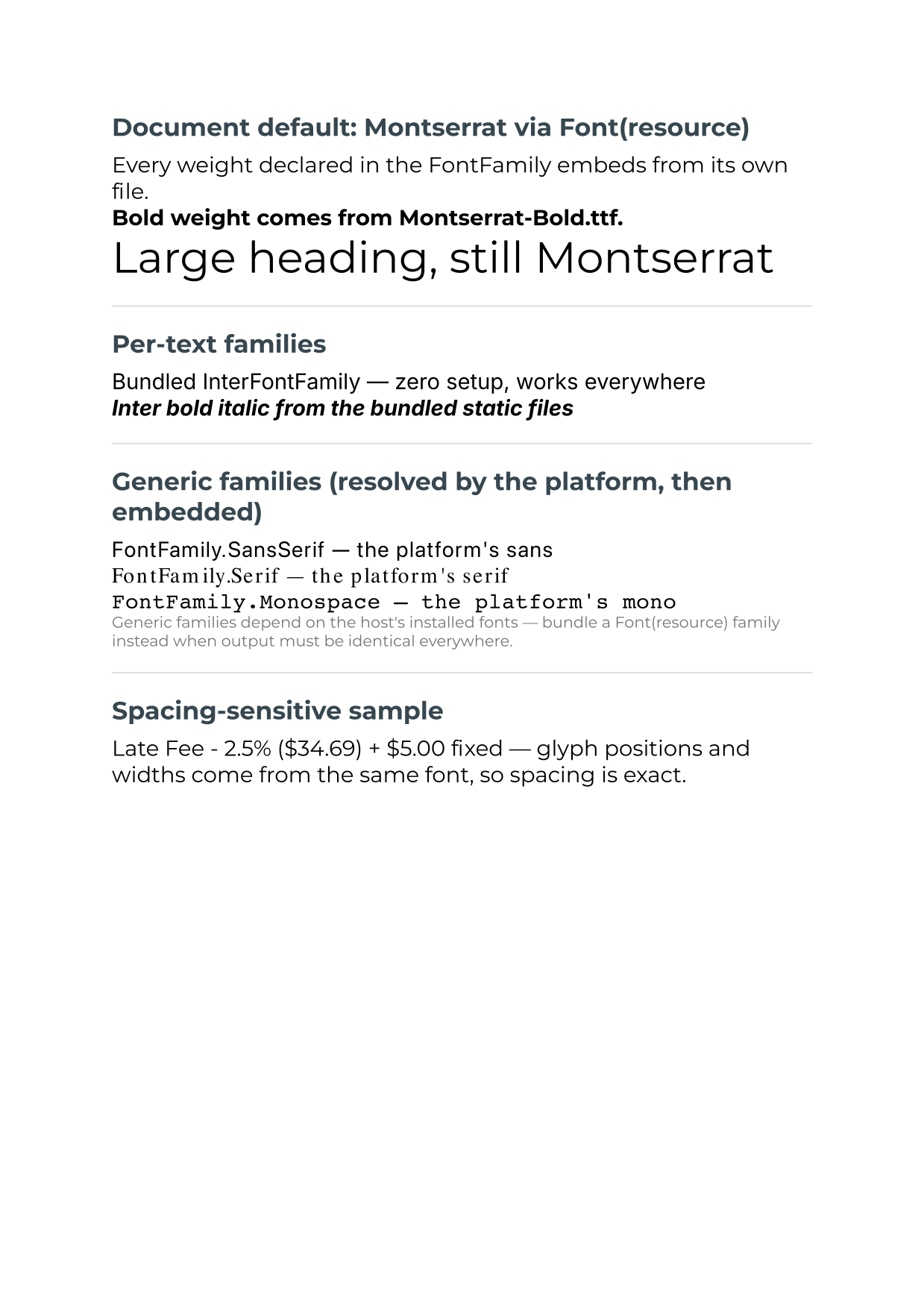 Custom fonts example (Montserrat via
 Font(resource), bundled Inter, generic families) — download PDF, source: 14_CustomFonts.kt
Default: InterFontFamily
By default, renderToPdf uses InterFontFamily – a bundled set of static Inter fonts:
| Weight | Style | File |
|---|---|---|
| Normal | Normal | Inter-Regular.ttf |
| Bold | Normal | Inter-Bold.ttf |
| Normal | Italic | Inter-Italic.ttf |
| Bold | Italic | Inter-BoldItalic.ttf |
These are embedded and subsetted automatically, so PDFs look the same on every system.
Any font works — automatically
Whatever font Compose lays the text out with is the font the PDF embeds. The renderer captures the exact typefaces from Compose’s font stack during composition, so custom fonts, theme typography, and platform defaults all render with correct glyphs and letter spacing — no configuration needed.
Using a custom font
Supply your own FontFamily — either as the document default or anywhere inside your
content (e.g. through your MaterialTheme typography):
val myFont = FontFamily(
    Font(resource = "fonts/MyFont-Regular.ttf", weight = FontWeight.Normal),
    Font(resource = "fonts/MyFont-Bold.ttf", weight = FontWeight.Bold),
    Font(resource = "fonts/MyFont-Italic.ttf", weight = FontWeight.Normal, style = FontStyle.Italic),
)

val pdf = renderToPdf(defaultFontFamily = myFont) {
    Text("Custom font!")
}
Place font files in your src/main/resources/fonts/ directory. The font does not
need to be installed on the machine — the loaded font data itself is subset and
embedded. Declare every weight/style you use so each renders from a real font file.
Shipping fonts with the app is the most reliable setup for servers. A headless
Linux JVM backend needs no fonts installed at all when the FontFamily is loaded
from resources — output is identical across dev machines, CI, and production.
Using system fonts
Pass null to use the platform default font instead:
val pdf = renderToPdf(defaultFontFamily = null) {
    Text("Using the system font")
}
The typeface the platform resolves (San Francisco on macOS, Roboto/DejaVu on Linux, Segoe UI on Windows) is embedded via subsetting. Note that output then depends on which fonts the host has installed — bundle the font in resources when you need identical output everywhere.
Font resolution chain
For each text run, the converter resolves the font in this order:
- Bundled Inter – Regular/Bold/Italic/BoldItalic (when the text uses
InterFontFamily) - Captured typefaces – the exact fonts Compose loaded while laying out this content (covers
Font(resource)/Font(file)families and theme typography) - The composition’s Skia font collection – the same lookup Compose’s text shaper uses for system fonts and glyph fallback
- Skia’s system font manager, then platform font directories – by family name
- PDF standard 14 – Helvetica, Times-Roman, Courier (last resort; never embedded). Substituted glyphs are automatically compressed to fit the space the layout measured, so text can’t overlap, and a warning naming the family is logged.
Variable fonts embed at their default instance only. PDFBox cannot instantiate
variable-font axes, so a variable font’s regular (default) instance embeds fine, but
instances styled away from the default — e.g. bold of a variable-only font like
macOS’s .SF NS — fall back to a compressed standard font. Prefer static .ttf/.otf
files per weight (most families, including Inter and Roboto, distribute them).
See also
- API Reference: Fonts – InterFontFamily details
- API Reference: renderToPdf – The
defaultFontFamilyparameter