Professional Invoice
A complete, real-world invoice demonstrating layout, shapes, text styling, links, and PdfRoundedCornerShape.
The result
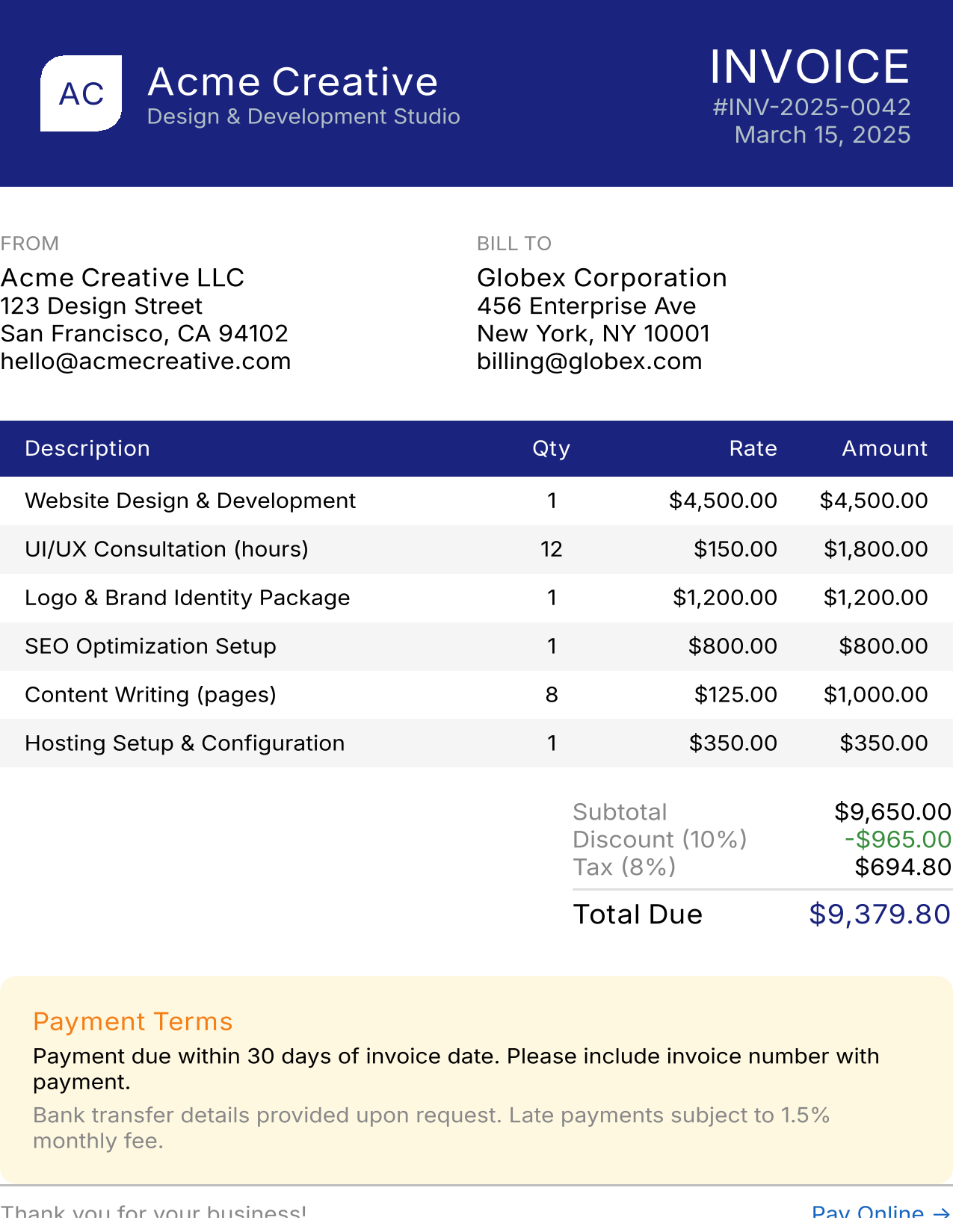
This example generates a US Letter-sized PDF with:
- Company branding header with navy background
- FROM / BILL TO address columns
- Itemized line items table with alternating row colors
- Subtotal, discount, tax, and total calculations
- Payment terms callout box
- Footer with a clickable “Pay Online” link
Entry point
val pdfBytes = renderToPdf(config = PdfPageConfig.LetterWithMargins) {
    Column(Modifier.fillMaxSize()) {
        InvoiceHeader()
        Spacer(Modifier.height(24.dp))
        AddressSection()
        Spacer(Modifier.height(24.dp))
        LineItemsTable()
        Spacer(Modifier.height(16.dp))
        TotalsSection()
        Spacer(Modifier.height(24.dp))
        PaymentTerms()
        Spacer(Modifier.weight(1f))   // Push footer to bottom
        InvoiceFooter()
    }
}
Key choices:
PdfPageConfig.LetterWithMargins– US Letter with 1-inch margins (standard business document)Spacer(Modifier.weight(1f))– pushes the footer to the bottom of the page
Header with company branding
@Composable
fun InvoiceHeader() {
    Row(
        Modifier
            .fillMaxWidth()
            .background(navy)
            .padding(20.dp),
        horizontalArrangement = Arrangement.SpaceBetween,
        verticalAlignment = Alignment.CenterVertically,
    ) {
        // Company logo + name
        Row(verticalAlignment = Alignment.CenterVertically) {
            Box(
                Modifier
                    .size(40.dp)
                    .clip(PdfRoundedCornerShape(topStart = 12.dp, bottomEnd = 12.dp))
                    .background(Color.White),
                contentAlignment = Alignment.Center,
            ) {
                Text("AC", color = navy, fontWeight = FontWeight.Bold, fontSize = 16.sp)
            }
            Spacer(Modifier.width(12.dp))
            Column {
                Text("Acme Creative", color = Color.White, fontWeight = FontWeight.Bold, fontSize = 20.sp)
                Text("Design & Development Studio", color = Color(0xFFB0BEC5), fontSize = 11.sp)
            }
        }

        // Invoice number + date
        Column(horizontalAlignment = Alignment.End) {
            Text("INVOICE", color = Color.White, fontWeight = FontWeight.Bold, fontSize = 24.sp)
            Text("#INV-2025-0042", color = Color(0xFFB0BEC5), fontSize = 12.sp)
            Text("March 15, 2025", color = Color(0xFFB0BEC5), fontSize = 12.sp)
        }
    }
}
Features used:
PdfRoundedCornerShapefor the asymmetric logo shapeArrangement.SpaceBetweento push logo left and invoice info right- Nested
Row/Columnfor complex layouts
Two-column address section
@Composable
fun AddressSection() {
    Row(Modifier.fillMaxWidth()) {
        Column(Modifier.weight(1f)) {
            Text("FROM", fontSize = 10.sp, fontWeight = FontWeight.Bold, color = Color.Gray)
            Spacer(Modifier.height(4.dp))
            Text("Acme Creative LLC", fontWeight = FontWeight.Bold, fontSize = 13.sp)
            Text("123 Design Street", fontSize = 12.sp)
            Text("San Francisco, CA 94102", fontSize = 12.sp)
        }
        Column(Modifier.weight(1f)) {
            Text("BILL TO", fontSize = 10.sp, fontWeight = FontWeight.Bold, color = Color.Gray)
            Spacer(Modifier.height(4.dp))
            Text("Globex Corporation", fontWeight = FontWeight.Bold, fontSize = 13.sp)
            Text("456 Enterprise Ave", fontSize = 12.sp)
            Text("New York, NY 10001", fontSize = 12.sp)
        }
    }
}
Pattern: Use Modifier.weight(1f) on both columns for equal 50/50 split.
Line items table
@Composable
fun LineItemsTable() {
    // Header row
    Row(
        Modifier.fillMaxWidth().background(navy).padding(horizontal = 12.dp, vertical = 8.dp),
    ) {
        Text("Description", Modifier.weight(3f), color = Color.White, fontWeight = FontWeight.Bold, fontSize = 11.sp)
        Text("Qty", Modifier.weight(1f), color = Color.White, fontWeight = FontWeight.Bold, fontSize = 11.sp, textAlign = TextAlign.Center)
        Text("Rate", Modifier.weight(1f), color = Color.White, fontWeight = FontWeight.Bold, fontSize = 11.sp, textAlign = TextAlign.End)
        Text("Amount", Modifier.weight(1f), color = Color.White, fontWeight = FontWeight.Bold, fontSize = 11.sp, textAlign = TextAlign.End)
    }

    // Data rows with alternating backgrounds
    for ((index, item) in invoiceItems.withIndex()) {
        val bg = if (index % 2 == 0) Color.White else lightGray
        Row(
            Modifier.fillMaxWidth().background(bg).padding(horizontal = 12.dp, vertical = 6.dp),
        ) {
            Text(item.description, Modifier.weight(3f), fontSize = 11.sp)
            Text("${item.quantity}", Modifier.weight(1f), fontSize = 11.sp, textAlign = TextAlign.Center)
            Text("$${"%,.2f".format(item.rate)}", Modifier.weight(1f), fontSize = 11.sp, textAlign = TextAlign.End)
            Text("$${"%,.2f".format(item.amount)}", Modifier.weight(1f), fontSize = 11.sp, textAlign = TextAlign.End)
        }
    }
}
Table pattern:
Modifier.weight()creates consistent column widths across rows (3:1:1:1 ratio)textAlign = TextAlign.Endright-aligns numeric columns- Alternating
Color.White/lightGraybackgrounds for readability
Footer with clickable link
@Composable
fun InvoiceFooter() {
    Divider(color = Color(0xFFBDBDBD))
    Row(
        Modifier.fillMaxWidth().padding(vertical = 8.dp),
        horizontalArrangement = Arrangement.SpaceBetween,
    ) {
        Text("Thank you for your business!", fontSize = 11.sp, color = Color.Gray)
        PdfLink(href = "https://pay.acmecreative.com/inv-2025-0042") {
            Text(
                "Pay Online →",
                fontSize = 11.sp,
                color = Color(0xFF1565C0),
                textDecoration = TextDecoration.Underline,
            )
        }
    }
}
The PdfLink creates a clickable region in the PDF that opens the payment URL.
Features demonstrated
| Feature | Where used |
|---|---|
PdfPageConfig.LetterWithMargins |
Entry point |
PdfRoundedCornerShape |
Logo in header |
PdfLink |
“Pay Online” in footer |
| Table pattern (Row/weight) | Line items table |
| Alternating row colors | Line items table |
Spacer(Modifier.weight(1f)) |
Push footer to bottom |
| Text alignment | Numeric columns |
| Background colors | Header, table rows |
| Nested Row/Column | Header, addresses |
See also
- Running Examples – Generate this PDF locally
- Usage: Layout – Table patterns
- Usage: Links – All link styles